The keys to the network — and almost nobody is watching them
A UniFi controller holds every VLAN, firewall rule, VPN, and remote tunnel on the network. Yet most RMMs never look at it. An attacker who reaches the controller doesn’t need malware — they just add an admin, flip on remote access, and walk out with a configuration backup.Two years after a forgotten Plex server seeded the LastPass breach, the tools MSPs rely on still ignore the edge appliances running the network. The Lavawall® UniFi monitor closes that gap: it polls each controller on your schedule, diffs the admin roster, backup set, and event stream against the last known-good snapshot, and raises a severity-ranked notification routed to your console, email, or PSA.
- Agentless — nothing is installed on the controller. Lavawall connects with a scoped admin account you control.
- Multi-tenant — every controller is scoped to one client, surfaced in the same console as your endpoint, cloud, and identity signals.
- Quiet until it matters — the first poll baselines silently, so you don’t get an alert flood. After that, only real changes fire.
- Supports UniFi OS (UDM, UDM Pro, Cloud Key Gen2+) and legacy self-hosted Network controllers.
Every change becomes a notification
Lavawall ranks each finding by severity so your queue reflects risk, not noise. De-duplication means a single ongoing condition is one item, and indicators close themselves automatically when the condition is reversed.
- ✓ New admin added
- ✓ Admin promoted to super-admin
- ✓ Suspicious admins (e.g. John Sim)
- ✓ Admin login from a flagged location
- ✓ Access / permission change
- ✓ Admin login from a new IP
- ✓ Remote / cloud access enabled
- ✓ Firewall or port-forward changed
- ✓ Firmware downgrade
- ✓ Admin removed
- ✓ Risky configuration (SSH, remote mgmt)
- ✓ Threat management (IPS/IDS) disabled
- ✓ Outdated firmware / pending update
- ✓ New configuration backup
- ✓ No recent configuration backup
- ✓ Device offline / outage
- ✓ Internet uplink (WAN) down
- ✓ Controller unreachable / auth failed
- ✓ Other indicator of compromise
Severity bands: Critical High Medium Operational. A permission change that creates a new super-admin is escalated to Critical automatically, as is any admin matching your known-bad watchlist. Operational items cover availability — device outages, WAN failures, and controllers Lavawall can’t reach.
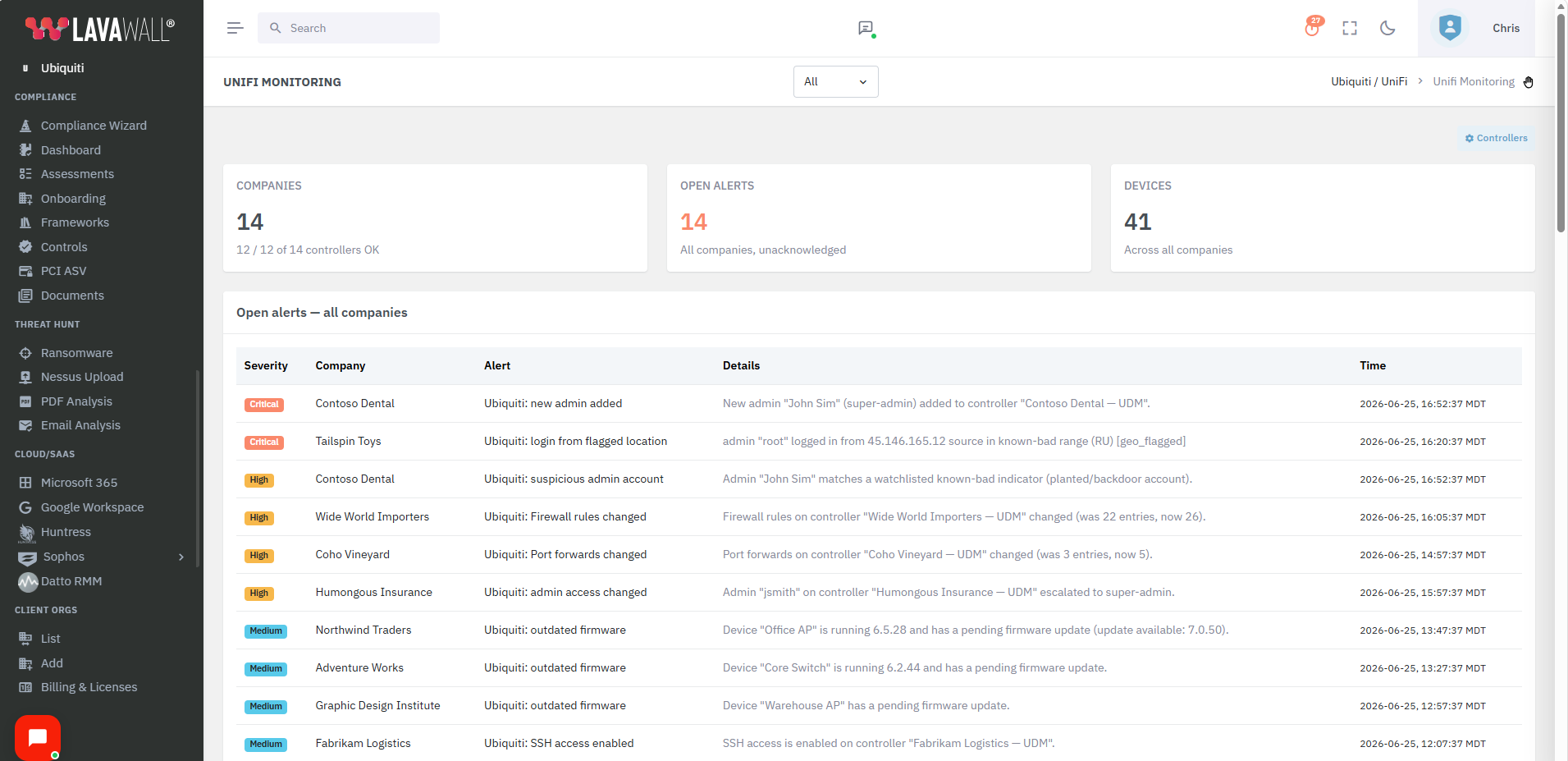
Cross-Tenant Open Alerts
Quickly get a view of all of the open alerts across all of your clients' tenants.Concerned about malicious users like John Sim being added, unexpected places, or new users?
Lavawall® has your UniFi indicators of compromise covered all at a glance! You'll even get proactive notifications!
Cross-Tenant Firmware Peace of Mind
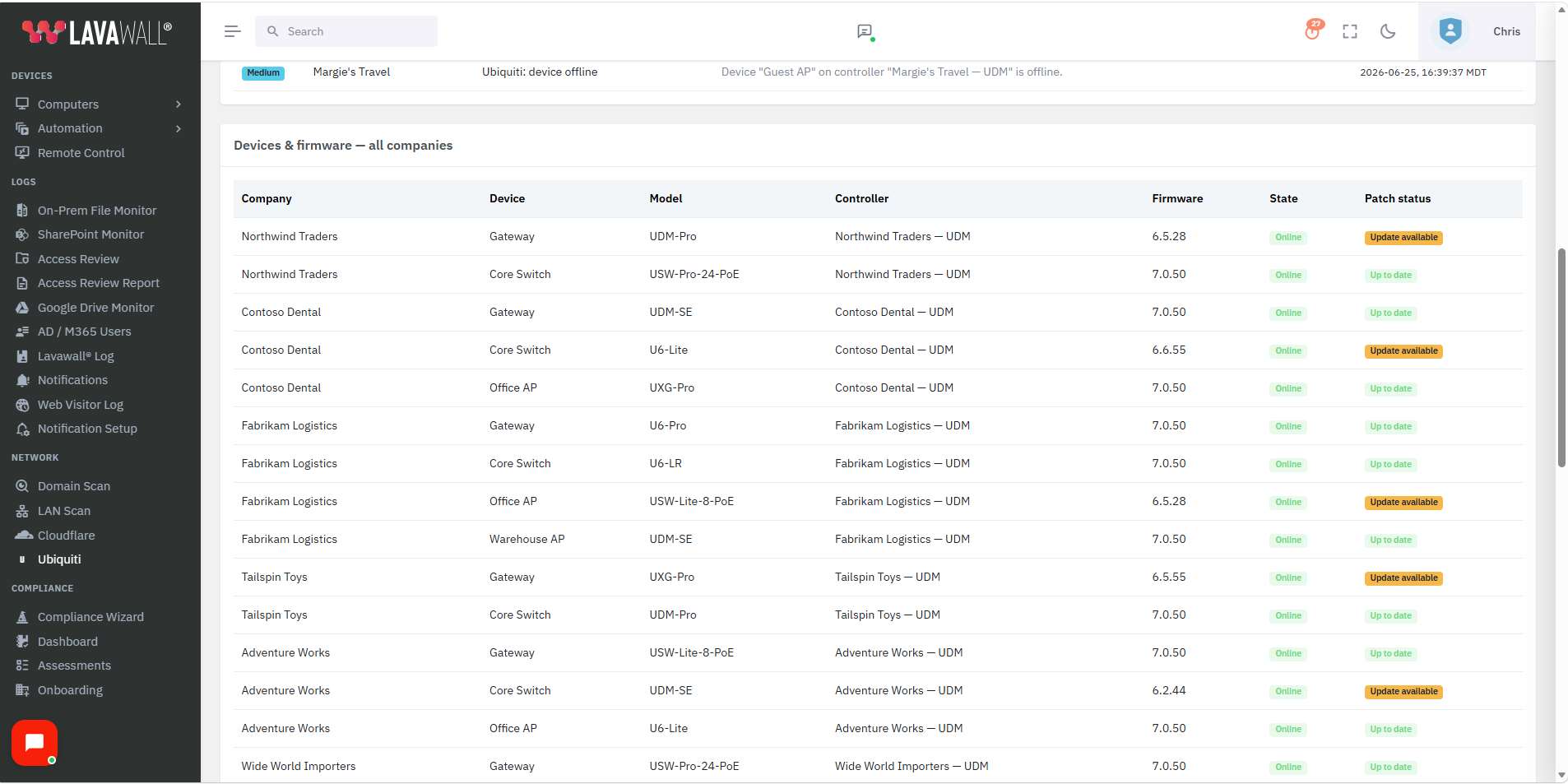
Worried about CVE-2026-33000, CVE-2026-34908, CVE-2026-34909, or CVE-2026-34910?Which device is outdated? With Lavawall® you would have had a notification as soon as it was out of date, so these wouldn’t have been an issue for you.
But for peace of mind, quickly check the device firmware update section to confirm that your Ubiquiti fleet is up to date.
Beyond the admin roster — config, posture & uptime
Adding an admin is only one way to weaken a network. Lavawall® also watches the settings an attacker (or a rushed change) can turn against you — and the availability signals that tell you a site is in trouble.
- Firewall & port-forward change detection. Every poll, Lavawall fingerprints the controller’s firewall rules and port-forward table. Open a port or alter a rule and you get a notification — the first baseline is silent, so only real changes fire.
- Security-posture checks. SSH access, remote/cloud management, automatic backups, and IPS/IDS threat management are surfaced as a posture panel, so a controller drifting out of a hardened state is visible at a glance and raised as a finding when it matters.
- Configurable IoC watchlist. Beyond planted accounts like “John Sim,” flag your own known-bad admin names, default/backdoor accounts (
ubnt,superadmin,backupadmin), anonymous-mail-provider admins, and logins from bad IP ranges — or restrict admin logins to an allow-listed set of networks. - Backup hygiene, both directions. A surprise backup is treated as possible exfil staging; an absent backup — nothing in 7+ days — is flagged as a reliability gap. You can also trigger an on-demand encrypted backup straight from the console.
- Device & uplink uptime. Device-offline outages and downed WAN / internet uplinks raise reliability alerts that close themselves automatically the moment service recovers. Per-device CPU and memory round out the health picture.
How it works
1. Connect
Point Lavawall at a UniFi OS or legacy controller with a scoped, limited admin account. The credential is encrypted at rest (AES-256-GCM) and kept off the web tier.
2. Baseline & diff
The first poll records admins, backups, and events without firing alerts. Every cycle after that compares live state to the snapshot and isolates exactly what changed.
3. Rank, route, resolve
Findings become severity-scored, de-duplicated indicators routed to the console, email, and your PSA — and they self-close when reversed.
Security first — least privilege, encrypted, on-box
- Encrypted credentials. Controller passwords are stored with AES-256-GCM. The key lives outside the web root and is never returned to the browser.
- Loopback-only daemon. The monitor binds to 127.0.0.1 — nothing it exposes is reachable off the box.
- Per-tenant isolation. Every query is scoped to the validated active company, so one client’s controllers can never be read or touched from another tenant.
- Use a limited account. A read-only or limited admin on the controller is enough for monitoring — no super-admin required.
What this shows you that your RMM and UniFi’s own alerts don’t
| Capability | Lavawall® UniFi Monitor | Typical RMM | UniFi built-in alerts |
|---|---|---|---|
| Multi-tenant firmware status and issue visibility on one screen | ✓ | ✗ | ✗ |
| Detects a newly added controller admin | ✓ Roster diff every poll | ✗ | Limited / email only |
| Flags admin promoted to super-admin | ✓ Auto-escalated to Critical | ✗ | ✗ |
| Flags indicators of compromise, including widespread malicious accounts like John Sim — plus your own watchlist | ✓ Auto-escalated to Critical | ✗ | ✗ |
| Surprise configuration backup created | ✓ Treated as possible exfil staging | ✗ | ✗ |
| Remote / cloud access silently enabled | ✓ | ✗ | ✗ |
| Firmware downgrade to a vulnerable build | ✓ | ✗ | ✗ |
| Admin login from an unfamiliar IP | ✓ Per-account new-IP detection | ✗ | Partial |
| Firewall rule or port-forward change detected | ✓ Config fingerprint every poll | ✗ | ✗ |
| Security posture — SSH, remote mgmt, IPS/IDS, auto-backup | ✓ Hardening panel + alerts | ✗ | ✗ |
| No recent configuration backup (backup hygiene) | ✓ Flagged after 7 days | ✗ | ✗ |
| Device offline / WAN-uplink-down uptime alerts | ✓ Auto-closes on recovery | Varies | Per-site |
| Connect agentlessly via local API or cloud Site Manager API | ✓ Both supported | ✗ | ✗ |
| Severity ranking & de-duplication | ✓ | ✗ | ✗ |
| Multi-tenant MSP console | ✓ Native | Varies | ✗ Per-site |
| Routes to PSA / ticketing | ✓ Integrated notifications | Varies | ✗ |
| Correlated with endpoint, cloud & identity signals | ✓ One console | ✗ | ✗ |
Part of the bigger picture
UniFi monitoring sits alongside the rest of Lavawall®, so a rogue network admin shows up next to your endpoint, cloud, and identity signals — not in yet another portal.
- LAN scan & asset management — pair controller monitoring with active network discovery and mapping.
- Microsoft 365 & Azure breach detection — correlate edge changes with cloud identity signals.
- GRC & compliance — turn change-monitoring into audit-ready evidence across 15+ frameworks.
- Smart notifications — ranked, de-duplicated, routed where your team already works.
Frequently asked questions
- Do I need to install anything on the UniFi controller?
No. Monitoring is fully agentless. Lavawall connects to the controller’s API with an admin account you provide — a read-only or limited admin is enough.
- Does it work with a UDM / UDM Pro / Cloud Key, or only self-hosted controllers?
Both. UniFi OS devices (UDM, UDM Pro, Cloud Key Gen2+) and legacy self-hosted Network controllers are supported. You pick the type when adding the controller; the default port is 443 for UniFi OS and 8443 for legacy.
- Will I get flooded with alerts when I first connect a controller?
No. The first poll records the current admins, backups, and events as a silent baseline. Notifications only fire on changes after that.
- How are the controller credentials protected?
They’re encrypted at rest with AES-256-GCM. The encryption key is stored outside the web root, and the password is never sent back to the browser. The monitoring service itself listens only on the local loopback interface.
- Does it connect locally, or through Ubiquiti’s cloud?
Either. Lavawall can poll a controller directly over its local Network API, or read your fleet through Ubiquiti’s cloud Site Manager API using a read-only API key — useful when a controller isn’t directly reachable. Both are agentless; the local path sees the most detail (admins, posture, firewall/port-forward, backups), while the cloud path covers inventory, firmware, and reachability.
- Does it detect firewall or port-forward changes?
Yes. On a local connection, each poll fingerprints the firewall rule set and port-forward table. The first poll is a silent baseline; after that, any change raises a notification so you can confirm it was authorized.
- Does it cover uptime, not just security?
Yes. Device outages and downed WAN / internet uplinks raise reliability alerts that auto-close when service is restored, and a controller with no backup in over seven days is flagged. Per-device CPU and memory are shown alongside firmware status.
- How quickly are changes detected?
You set the poll interval per controller (minimum 60 seconds; 5 minutes is a sensible default). Each poll diffs live state against the stored snapshot.
If you have any questions or need further assistance, feel free to reach out through our chat, phone, or email on our contact page!